
The 30-second answer: Flicker that lines up with a motor or heater starting points to a load surge. Lights that dim steadily while the generator runs point to an overloaded unit or low output. Flicker with nothing plugged in points to the voltage regulator, the engine speed, or a loose wire. Check the load first, then the connections, then the outlet voltage at idle and under load.
Lights that flicker or dim are a symptom, not a diagnosis. The same flicker can come from a refrigerator compressor kicking on, a loose plug in the wall, an engine that is struggling to hold speed, or a regulator that can no longer hold the output steady. The pattern tells you which one to suspect, so the first job is to watch what happens and when.
Step One: Note When the Flicker Happens
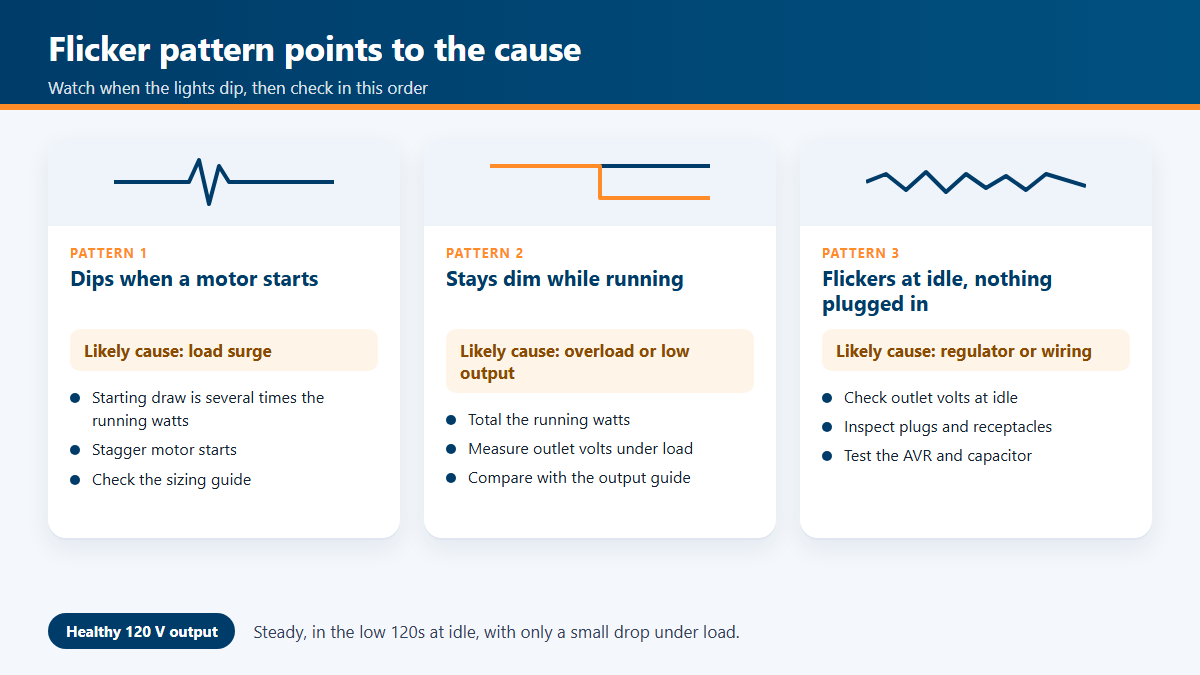
Before you touch anything, write down what the lights do and what else is running at the time. Three patterns cover most cases:
- Flicker when a motor starts. A compressor, well pump, or sump pump draws a large starting surge. The lights dip for a second and recover. This is a load problem.
- Steady dimming while the generator runs. The lights stay low for as long as the load is on. This points to an overloaded generator, or to output that is low across the board.
- Flicker at idle with nothing plugged in. This points to the regulator, the engine governor, a loose wire, or a fault in the control circuit.
The chart below lines up each pattern with the likely cause and the first check to make.
Step Two: Check the Load
Add up the running watts of everything connected, then add the starting surge of every motor. A motor can draw several times its running watts for the first moment it starts, and the generator’s output sags while it catches up. A refrigerator, a well pump, and an air conditioner are the usual culprits. If the flicker only happens when a motor starts, the fix is usually to reduce the load, stagger the starts so two motors never kick on together, or move to a larger generator. The starting watts guide explains the numbers, and the sizing guide helps you check whether the unit is simply too small for the job.
Check the nameplate on the generator. It lists rated running watts and sometimes a surge figure. Keep the total running load under the rated running watts, and leave some margin. A unit running close to its limit will sag more readily when a motor starts.
Step Three: Check the Connections
Shut the generator off before you touch any plug, cord, or panel connection. Work through each point the power passes through:
- The receptacles on the generator itself. Look for discoloration, a melted look, or a face that feels warm.
- Extension cords and their plugs. A cord that gets warm at the plug or the connector is failing.
- Any transfer switch, interlock, or panel connection. Look for loose lugs and heat marks.
A receptacle with heat damage has to be replaced, not cleaned. A cord that is hot at the plug is a fire risk, so stop using it. When the connections are sound, the flicker is more likely to come from the load or from the engine and regulator side.
Step Four: Measure the Outlet Voltage
Set your multimeter to AC volts, in a range above 120. Start the engine and let it settle for a few minutes. Measure across the hot and neutral slots of a running outlet, first at idle with nothing connected, then with a steady load such as a space heater or a work light. Write down both readings.
A 120-volt generator should hold a steady reading near 120 volts, typically in the low 120s at idle and a little lower under load. Some drop under a heavy load is normal. What is not normal is a reading that wanders up and down with no change in load, a reading that swings by several volts from second to second, or a steady drop that gets worse as the engine warms up. The output guide, generator putting out low or high voltage, covers the readings in more detail.
If your meter reads frequency, check that too. Generator output voltage follows engine speed. A unit whose engine has slowed will show less voltage and a lower frequency, and the lights will dim with it. A slow engine is often a fuel, air, or governor problem rather than an electrical one.
Watch: “Why Your Lights Flicker on Diesel Generator Power!” by WellandTV on YouTube. A short video on lights flickering while a diesel generator is supplying power. Check its points against the readings you took above.
Step Five: Check the Governor, Regulator, and Capacitor
Voltage that drifts with no change in load is usually one of three things: an engine that is not holding its speed, the automatic voltage regulator (AVR), or a capacitor in the excitation circuit. Check them in that order.
Start with the engine. Look at the governor linkage for stiffness or wear, and make sure the throttle moves freely. A governor that hunts up and down will make the lights flicker in a steady rhythm. The overspeeding guide covers the governor side of that problem, and the idle control guide covers throttle and idle problems.
Next, the regulation side. The AVR test guide and the capacitor test guide give the measurements for each part. Replace a part only after the readings show it has failed. A worn regulator can look like a bad generator when the wiring is fine, so do not buy parts on a guess.
Inverter Generators Are Different
If your unit is an inverter generator, the flicker usually does not come from the same place. An inverter makes clean power electronically, and its engine speed changes with the load. A flicker that happens when the engine changes speed, along with a surge in the sound, often points to a load sensor or an eco-mode setting. Check the manual’s eco-mode settings before you test the wiring. The inverter eco mode guide covers that case.
Symptom Table
| What you see | Most likely cause | First thing to do |
|---|---|---|
| Dip when a motor starts, then recovers | Starting surge exceeds capacity | Stagger starts, or reduce the load |
| Dim while running, worse as load goes on | Overload or low output | Total the running watts |
| Steady rhythmic flicker at idle | Governor hunting or linkage wear | Inspect the throttle and governor linkage |
| Voltage drifts with no load change | AVR or capacitor | Test the AVR and capacitor |
| Flicker only at one outlet or cord | Loose or failing connection | Inspect and replace the receptacle or cord |
| Lights dim, engine sounds slow | Fuel, air, or governor problem | Check the fuel and air filter first |
Stop the generator and disconnect the load if you smell burning, see melted plastic, hear arcing, or notice a plug that is too hot to hold. Do not open the control panel or touch the regulator while the engine is running.
When to Call a Technician
Call a qualified technician if the output stays unstable after the load and connection checks, if the voltage reads far outside the normal range, or if you find burned wiring inside the control box. Those problems need meters, a service manual, and sometimes a field test that is easy to get wrong.
Frequently Asked Questions
Why do my lights flicker only when the refrigerator starts?
The compressor motor draws a starting surge that is much larger than its running load. The generator’s output dips for a moment, and the lights follow. A larger generator, a soft starter for the motor, or a different load mix usually solves it.
Is a flickering generator dangerous?
Flicker by itself is mostly an annoyance, but it can mean loose connections or unstable voltage. Both can damage electronics. Check the connections, and read the guide on powering electronics safely if you run computers or medical equipment.
Will a surge protector stop the flicker?
No. A surge protector guards against spikes. It does not hold the voltage steady, and it cannot fix a load that is too large for the generator.
My lights flicker only when the generator is cold. Why?
A cold engine can run with a richer mixture and a slower idle until it warms up. If the lights clear once the engine is warm, check the choke, the fuel, and the idle setting. The cold weather guide has the checks.